¶ Introduction
XignSys GmbH provides flexible and secure means to authenticate users in a broad spectrum of applications with its modern technology XignIn. One of the key components used in systems utilizing this technology is the XignSys SDK which is on the one hand used in the official apps (e.g. Xign.Me) and on the other hand can be integrated in other apps that then may benefit from strong and easy authentication as well. It is available for the platforms iOS and Android and is itself largely written in the programming languages Swift and Kotlin respectively.
This document describes the main features of the SDK and guides developers who wish to implement some or all processes the SDK offers in their own applications.
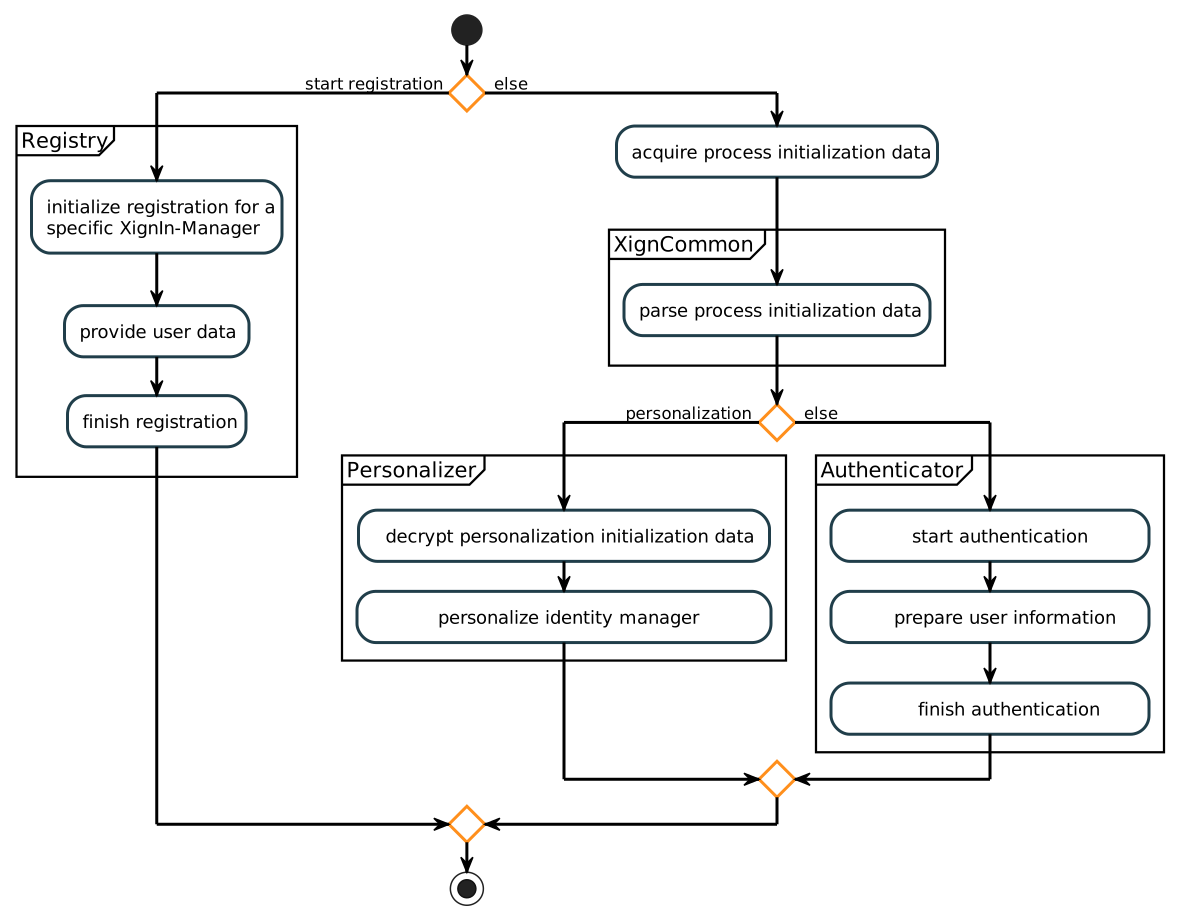
The XignSys SDK provides three main components, each with a distinct set of features.
- Registration: Register as a new user at a specific XignIn-Manager.
- Personalization: Personalize one or more identity managers.
- Authentication: Authenticate via QR-Code or Deep-Link.
The following diagram shows the general flow of these core functionalities that are each described in more detail in their respective sections.
Many parts of the documentation provide code examples to give a rough idea on how some functions/processes can be implemented. Beware though, these snippets act as examples only and should in almost all cases not just be copied without second thought. Often some aspects are simplified, such as user input handling or production grade error handling.
These simplified code examples are largely presented in both Swift and Kotlin but to increase the readability of this document, explanatory texts mostly use naming conventions (e.g. parameter lists) of Swift. Due to the similar structure of the SDK on both platforms adaption should not be a problem.
Furthermore, the SDK offers both synchronous (blocking) and asynchronous (non-blocking) function variants. Depending on the suitability for documentation purposes, some code examples prefer usage of one or the other variant. Please take a look at the section Non-Blocking Calls if you are interested in how these differ and can be utilized.