¶ Open Id Connect Integration
To user the XignIn-Manager as OpenId Connect provider, the following URLs might be helpful:
| Endpoint | url |
|---|---|
| OpenId-Configuration | https://xign.me/.well-known/openid-configuration |
| Issuer | https://xign.me |
| Authorization Endpoint | https://xign.me/openid/authenticate |
| Token Endpoint | https://xign.me/openid/token |
| JWKS Endpoint | https://xign.me/openid/jwks |
| User Info Endpoint | https://xign.me/openid/user |
¶ Supported Authentication Flows
The following OpenId Connect flows are currently supported:
| status | OpenId Connect Specification | |
|---|---|---|
| Authorization Code Flow | SUPPORTED | https://openid.net/specs/openid-connect-core-1_0.html#CodeFlowAuth |
| Implicit Flow | UNDER CONSTRUCTION | https://openid.net/specs/openid-connect-core-1_0.html#ImplicitFlowAuth |
| Hybrid Flow | UNDER CONSTRUCTION | https://openid.net/specs/openid-connect-core-1_0.html#HybridFlowAuth |
¶ Setup
The OpenId Connect process contains the following steps:
- The user requests a login to a third party client.
- Third party clients sends an OpenId Connect authorization request to the XignIn-Manager according the AuthRequest specification To send these request, the server needs some information to create a valid request:
| attribute | description |
|---|---|
| clientId | REQUIRED. The client id will be provided from the XignIn-Manager if an service was created (see: services) |
| redirectUri | REQUIRED. Redirection URI to which the response will be sent. This URI MUST exactly match one of the Redirection URI values for the Client pre-registered at the OpenID Provider. The redirectUri is provided from the third party client and should be entered in the XignIn-Manager |
| scope | REQUIRED. OpenID Connect requests MUST contain the openid scope value. Can contain some more scopes (see: ScopeClaims) |
| prompt | should be login |
| nonce | OPTIONAL. String value used to associate a Client session with an ID Token, and to mitigate replay attacks. (see: NonceNotes) |
| state | RECOMMENDED. Opaque value used to maintain state between the request and the callback. |
| claims | OPTIONAL. This parameter is used to request that specific Claims be returned. The value is a JSON object listing the requested Claims. (see: ClaimsParameter) |
| request | OPTIONAL. This parameter enables OpenID Connect requests to be passed in a single, self-contained parameter and to be optionally signed and/or encrypted. (see: JWTRequests) |
- The XignIn-Manager initialized a new OpenId-Connect login and returns a Login page for the user to authenticate.
- Display the Login page to the user.
- The user performs the authentication against the XignIn-Manager
- If the user is sucessfully authenticated, the XignIn-Manager redirects the user to the given url, containing an
AuthorizationCodeto retrieve the id-token - The user will be redirected to the thrid party client
- With the
AuthorizationCodeand the stored clientId and ClientSecret the third party client performs a request to the XignIn-Manager to get some information about the authenticated user. (see: TokenEndpoint) - As a result the XignIn-Manager answers with a JSON object containing the id-token with the user information. (see: TokenResponse and IDToken)
- If the XignIn-Manager has encrpyted the id-token, then the thid party client should decrypt it first
- A verification of the signed id-token should always be done.
- The id-token contains the data about the authenticated user. Next to the standard attributes (see: IDToken) it also can contains user attributes (see: StandardClaims)
- The third party client can login the user
¶ Platform integrations
¶ Keycloak
¶ Integration via OpenID Connect Federation
To integrate XignIn, an OpenID Connect Provider (IDP) needs to be created
- Log into the administration console
- From the drop down on the upper left side, select the
realmin which the IDP should be created
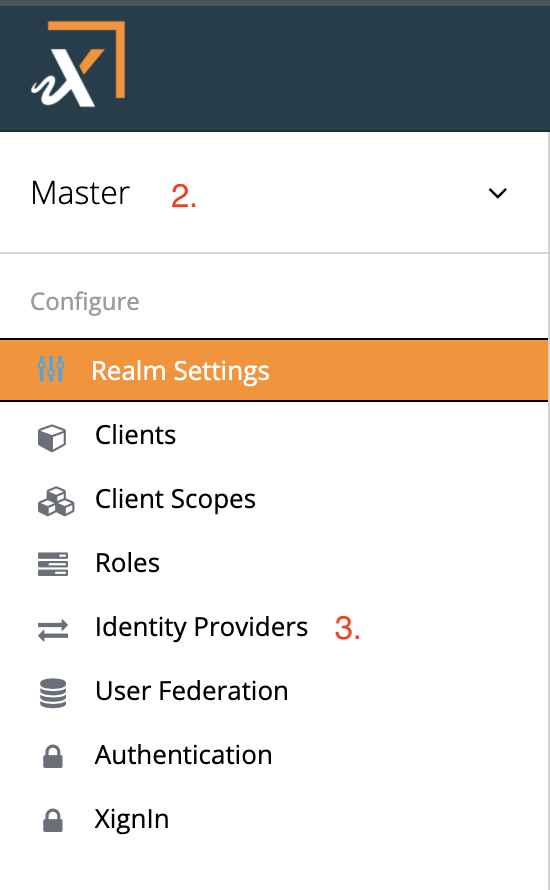
Fig. Select Realm
- Select the option
Identity Providers - From the following screen select OpenID Connect v1.0 in the drop-down menu
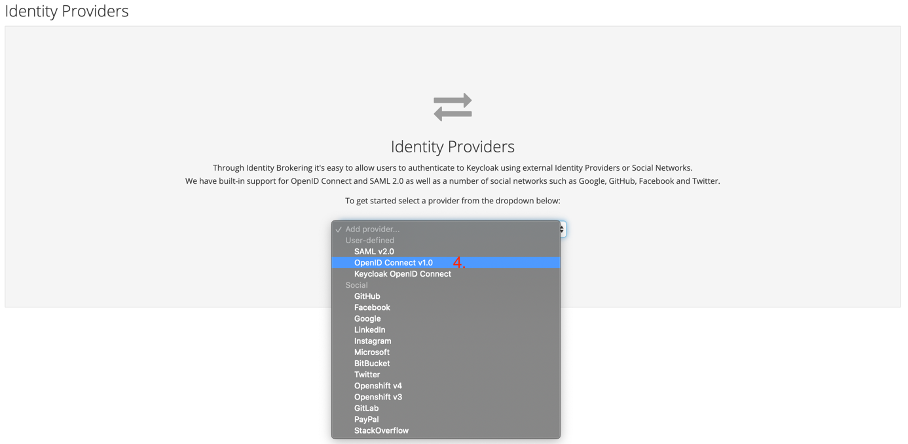
Fig. Select OpenID Connect Protocol
- Configure the Identity Provider, these are the mandatory configuration options
| attribute | description |
|---|---|
| Alias | The alias for the IdP, internally used by XignIn Identity |
| Authorization URL | The URL, XignIn Identity sends the user-agent to, to authenticate the user. |
| Token URL | The URL, XignIn Identity retrieves the identity token from, after authentication |
| Client Authentication | Should be Client Secret as Basic Auth or Client Secret as Post |
| Client ID | The ID of the XignIn Identity client in the XignIn System (generated after registering the client with XignIn) |
| Client Secret | The Client Secret of the configured client in the XignIn System (generated after registering the client with XignIn) |
| Default Scopes | The scopes (i.e. the user attributes) that should be included in the identity token (set the value to profile email) |
If setting the Import External IDP Config-URL to
https://xign.me/.well-known/openid-configurationthen most of the required attributes will be set.
¶ Set as default IDP
Setting XignIn as default IdP has the advantage that unauthenticated users will be directly redirected to XignIn, otherwise the user will be presented with a list, where he has to choose from all configured IdPs.
To configure XignIn as the default IdP follow these steps:
- Go to Authentication > Flows and make a copy of the Browser flow
- Open the configuration of the Identity Provider Redirector Auth Type by choosing Actions > Config and you will see the following UI

Fig. Set as Default IDP Step 2
- Under Default Identity Provider enter the name of the created OpenID Connect Identity Provider from the previous steps and an Alias for this configuration and save the settings
- If the settings are successfully saved the Identity Provider Redirector will be suffixed with the Alias given to the configuration:
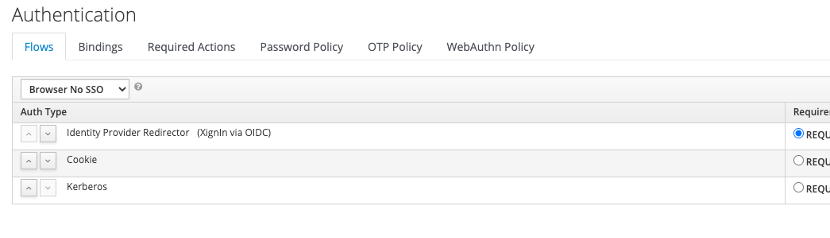
Fig. Set as Default IDP Step 4
¶ Create User on first login
The Identity Provider can be configured to automatically create a xidentity user (if not already existing) when he first logs in with XignIn. To configure this behaviour, follow these steps:
- Go to Authentication > Flows and copy the First Broker Login flow
- Delete all unnecessary Auth Types as shown in the following example, set User Creation Or Linking as REQUIRED and Create User If Unique as ALTERNATIVE
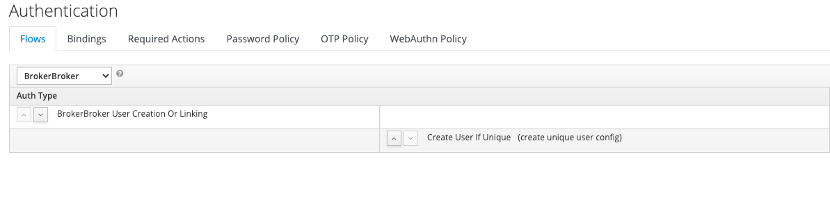
Fig. Create new First Broker Login
- Set the newly created flow in the First Login Flow section of the IdP settings

Fig. Set new Default Broker Login
¶ Account mapping
When authenticating via OpenID Connect for the first time, XignIn Identity applies following logic to the process:
Keycloak checks whether a user exists with the same e-mail address, which is delivered in the Identity Token
- If a user exists, he/she is prompted for his/her password to link the account to the identity provided by XignIn
- If there is no existing user, a new user is created and registered in XignIn Identity, that is linked to the provided Identity (in this case the e-mail address will be the username of the newly created user)
¶ Redirect URI for XignIn
XignIn Identity has to be registered with XignIn prior to completing the configuration of the IdP. The Redirect URI, which has to be registered as well during the registration at XignIn will be of the form:
https://<xidentity-host>/auth/realms/<realm-name>/broker/oidc/endpoint
XignIn will redirect the user-agent to this URL, while appending an authorization code for retrieving the token response (i.e. the identity token)
¶ DRACOON
¶ Salesforce
¶ Encryption and Signature
As specified in the OpenId Connect specification the XignIn-Manager supports different Signature and Encryption methods to secure the id_token and the userinfo responses.
¶ Signatures
Signature algorithms
- RS256 (RSASSA-PKCS1-v1_5 mit SHA256)
- 4096 Bit key length
- ES256 (ECDSA mit P-256 und SHA-256)
- secpr256r1 aka prime256v1
¶ Encryption
Encryption algorithms and modes
- RSA-OAEP mit A256CBC_HS512
- 4096 Bit key length
- ECDH-ES mit A256CBC_HS512
- secpr256r1 aka prime256v1